[ Whereis® API Home ] [ Developers' Guide ] [ Controls ]
A listener or 'observer' is a code pattern that provides a way of registering interest in an event. Every time the event occurs, the listener is informed.
You add a listener by registering an event with the object you want to 'listen' to. To monitor whether the mouse is moving over the map, register a 'mousemove' event with the Map object. To monitor whether the map has been clicked, register a 'click' event.
var map = new EMS.Map("map-div");

map.events.register("click", this, clickListener);

function clickListener(e){

     map.mouseDefaults.cancelRecenter();
	//use custom onclick behaviour, don't recenter

	 alert("Somebody clicked the map!");

}
Supported Events
The following standard events are supported: mouseover, mouseout, mousedown, mouseup, mousemove, moveend, dragstart, dragend, click, dblclick, resize, focus, blur.
You can also use the following map-related events.
Name | Description |
addlayer | Called when a layer is added to a map |
removelayer | Called when a layer is removed from a map |
changelayer | Called when a layer is changed |
zoomend | Called when the map has been zoomed |
popupopen | Called when a popup is opened |
popupclose | Called when a popup is closed |
addmarker | Called when a marker is added to a map |
removemarker | Called when a marker is removed from a map |
clearmarkers | Called when all markers are cleared from a map |
changebaselayer | Called when the base layer is changed |
inactiveclick | Called if the map is inactive and the user clicks on the map area |
| resize | Called if the map is resized |
Calculation of position for an event
When using a listener, you often need to identify the user's mouse position in relation to the map. Depending on what you're trying to do, you may want to know the mouse-pointer's pixel position within the map or its geographical position as a set of lat/long coordinates within the mapped area.
The EMS JavaScript API uses four key methods to handle the calculations.
Name | Description |
OpenLayers.Util.pagePosition (<screenElement>) | Returns the position of a screen element in relation to the top left corner of the current page |
EMS.Event.pointerX(<event>) | Returns the pixel position of an event on the X axis (horizontally) in relation to the top left corner of the current page |
EMS.Event.pointerY(<event>) | Returns the pixel position of an event on the Y axis (vertically) in relation to the top left corner of the current page |
EMS.Services.Map.getLonLatFromViewPortPx(<pixelPosition>) | Converts pixel position within the viewing area (div) for the current map to a set of latitude and longitude coordinates, returned as a WGS84 LonLat object |
1. First calculate where in the map's div (or 'viewport') the mouse-click occurred.
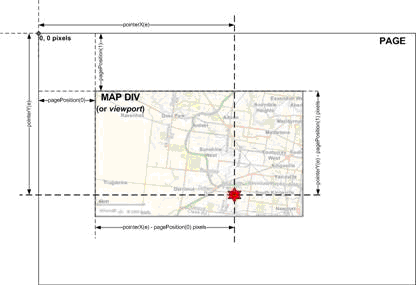
2. Then use Map.getLonLatFromViewPortPx(Pixel) to translate the pixel position into latitude and longitude coordinates that relate to the map currently displayed within that div.
var map = new EMS.Services.Map("map-div");
map.events.register("mousemove", this, mouseListener);


function mouseListener(e){

//Get position of div in relation to the page
  var pos = OpenLayers.Util.pagePosition                      (document.getElementById("map-div"));

//pointerX and pointerY return pixel pos in page.
//Subtract div's x/y offsets to get pixel pos in div
  var x = EMS.Event.pointerX(e)-pos[0];//pixel pos
  var y = EMS.Event.pointerY(e)-pos[1];//pixel pos

//Convert x/y to lonlat
  mousePos = map.getLonLatFromViewPortPx(new OpenLayers.Pixel(x, y)).asWGS84();
  mouseString = mousePos.lat.toFixed(5) + ", " + mousePos.lon.toFixed(5);
  document.getElementById("position-div").innerHTML = "[" + mouseString + "]";

}
