[ Whereis® API Home ] [ Developers' Guide ]
Maps are constructed in layers. The base map displays physical features, such as coastline, while higher layers display street names, post office symbols, and so on.
In addition to traditional map content, an interactive EMS map facilitates the display of additional features, such as markers to indicate points of interest, popups, and map controls. These features are also organised onto layers.
By default, an EMS map makes the following layers available.
Name | Description |
EMS.Layer.STREET | A standard map |
EMS.Layer.PHOTO | Satellite or aerial photography |
EMS.Layer.HYBRID | Street/town labels overlay for the PHOTO layer. |
EMS.Layer.ROUTE | On which to display route lines and other geometry |
EMS.Layer.MARKERS | On which to display markers and points of interest (POIs) |
EMS.Layer.BIGTEXT_STREET | A standard map with larger text for high pixel-per-inch displays, eg Retina |
EMS.Layer.BIGTEXT_HYBRID | Street/town labels overlay for the PHOTO layer, with larger text for high pixel-per-inch displays, eg Retina. |
To specify the map's base layer, simply pass its name as an option to the map constructor. The following example attaches the photo layer, which will display a satellite image.
map = new EMS.Map("map-div", {

	 // Photo layer is not visible by default, set visibility in the options
     layers: [new EMS.Layer.Photo({visibility: true})]

});
Once attached, layers can be referenced through the Map object, using Map.getLayerByName(layer)
You should never need to access the route or marker layers directly.
Large text for high pixel-per-inch displays
For high pixel-per-inch displays, eg Apple Retina displays, use maps with larger text for better legibility.
map = new EMS.Map("map-div", { textSize: EMS.TextSize.BIGTEXT } );
Z-Order
Like any other element on an HTML page, map layers can be manipulated according to their z-index.
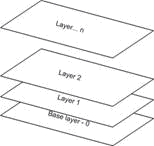
In an OpenLayers map, overlays (above the traditional map content) begin at a z-index of 325. Popups start at 750. Map controls start at 1000.
